Notice: file_put_contents(): Write of 128 bytes failed with errno=122 Disk quota exceeded in /home/u432326315/domains/fq101.co.uk/public_html/libraries/vendor/joomla/filesystem/src/File.php on line 279
Notice: file_put_contents(): Write of 128 bytes failed with errno=122 Disk quota exceeded in /home/u432326315/domains/fq101.co.uk/public_html/libraries/vendor/joomla/filesystem/src/File.php on line 279
Notice: file_put_contents(): Write of 128 bytes failed with errno=122 Disk quota exceeded in /home/u432326315/domains/fq101.co.uk/public_html/libraries/vendor/joomla/filesystem/src/File.php on line 279
Notice: file_put_contents(): Write of 128 bytes failed with errno=122 Disk quota exceeded in /home/u432326315/domains/fq101.co.uk/public_html/libraries/vendor/joomla/filesystem/src/File.php on line 279 Service counter reset
Notice: file_put_contents(): Write of 128 bytes failed with errno=122 Disk quota exceeded in /home/u432326315/domains/fq101.co.uk/public_html/libraries/vendor/joomla/filesystem/src/File.php on line 279
Notice: file_put_contents(): Write of 128 bytes failed with errno=122 Disk quota exceeded in /home/u432326315/domains/fq101.co.uk/public_html/libraries/vendor/joomla/filesystem/src/File.php on line 279
Notice: file_put_contents(): Write of 128 bytes failed with errno=122 Disk quota exceeded in /home/u432326315/domains/fq101.co.uk/public_html/libraries/vendor/joomla/filesystem/src/File.php on line 279
Notice: file_put_contents(): Write of 128 bytes failed with errno=122 Disk quota exceeded in /home/u432326315/domains/fq101.co.uk/public_html/libraries/vendor/joomla/filesystem/src/File.php on line 279
Notice: file_put_contents(): Write of 128 bytes failed with errno=122 Disk quota exceeded in /home/u432326315/domains/fq101.co.uk/public_html/libraries/vendor/joomla/filesystem/src/File.php on line 279
Notice: file_put_contents(): Write of 128 bytes failed with errno=122 Disk quota exceeded in /home/u432326315/domains/fq101.co.uk/public_html/libraries/vendor/joomla/filesystem/src/File.php on line 279
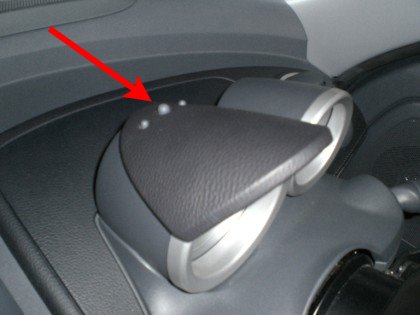
Service counter reset
The Roadster uses the centre button of the three:
Switch on the ignition and double tap the centre button to select the service interval
Switch the ignition off (the interval will remain in the display)
Now before the display reverts back to current mileage, press and hold the centre button, whilst turning the ignition back on.
Keep holding, and the display will flash, and the new service interval will display.
You will also note, that the number of spanners will change from 1 to 2, or vice versa, indicating an A or B service.