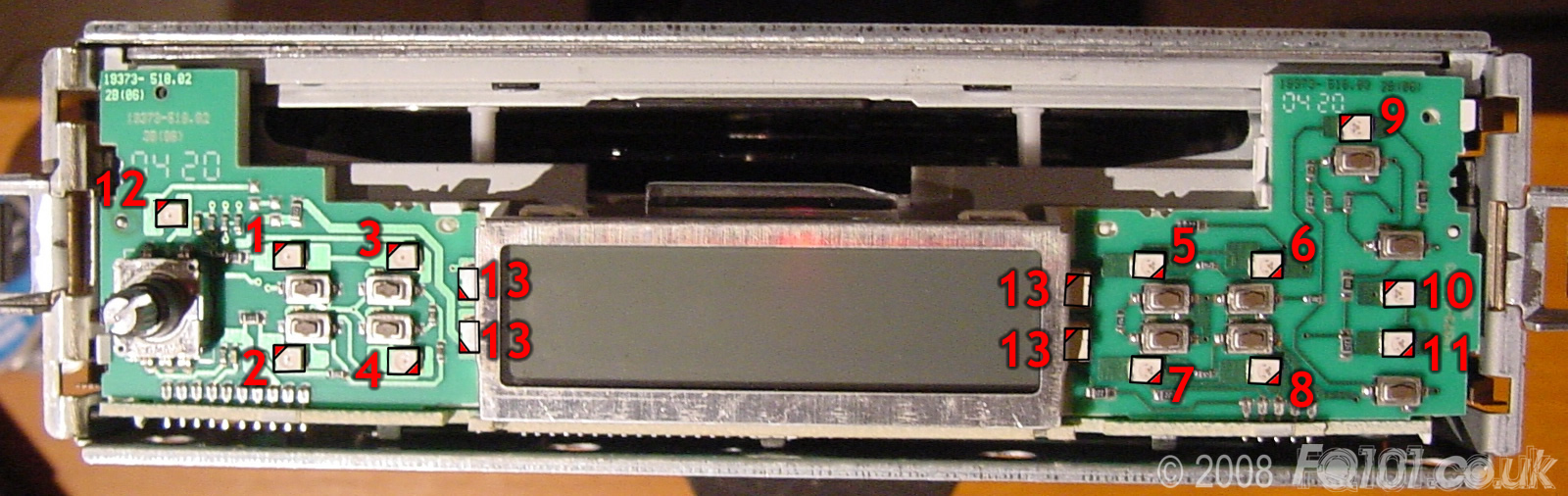
The following layout is for the standard Grundig CD Head Unit.
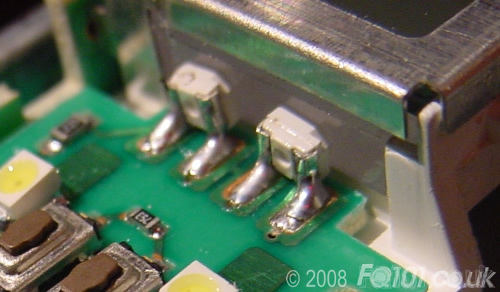
Click on the picture to make larger. LED orientation is shown with a triangle pointing to the cut-out on the negative side of the LED. The screen is lit with side LEDs. SMT PLCC-2 LEDs can be used to replace these when mounted at 90 degrees - see picture at bottom of page for details. Observe correct polarity when soldering.
| No. | Type | OEM Colour | Function |
|---|---|---|---|
| 1 | PLCC-2 | Warm White | TP Button |
| 2 | PLCC-2 | Warm White | Audio Settings |
| 3 | PLCC-2 | Warm White | FM/AM Button |
| 4 | PLCC-2 | Warm White | CD Button |
| 5 | PLCC-2 | Warm White | Button '1' |
| 6 | PLCC-2 | Warm White | Button '2' |
| 7 | PLCC-2 | Warm White | Button '3' |
| 8 | PLCC-2 | Warm White | Button '4' |
| 9 | PLCC-2 | Warm White | CD Eject Button |
| 10 | PLCC-2 | Warm White | Tune Up Button |
| 11 | PLCC-2 | Warm White | Tune Down Button |
| 12 | PLCC-2 | Warm White | Volume Backlight |
| 13 | Side LED | Warm White | LCD Backlight |
Detail of soldering PLCC-2 LEDs to replace side LEDs: